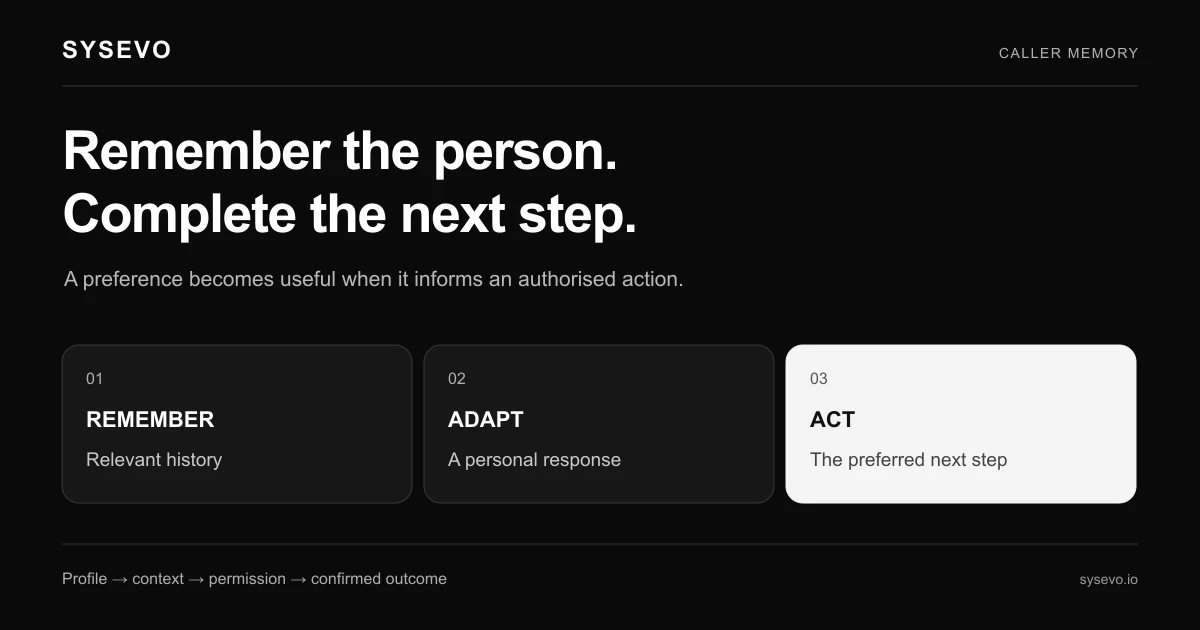
Call memory is the ability of an AI voice agent to retain and recall information about a customer across multiple conversations and touchpoints. Rather than treating each call as an isolated interaction, an AI system with robust call memory tracks previous issues, preferences, account status, and communication history to provide contextual, informed responses without requiring the customer to repeat themselves.
For operations teams managing support volume or sales processes, this difference is substantial. A customer calls about a billing dispute, hangs up, and calls back three days later. Without call memory, the agent starts from zero. With it, the agent knows the dispute exists, what was already attempted, and can move directly to resolution. That shift saves time, reduces frustration, and changes the economics of customer service automation.
Why Call Memory Matters in Customer Service
The friction of repetition is real and measurable. Studies by customer experience researchers indicate that 60 to 70 percent of customer frustration stems not from a single unresolved issue, but from having to re-explain that issue to multiple agents or across multiple contacts. Each re-explanation burns time and erodes trust. An AI agent without call memory recreates that problem at scale.
Call memory eliminates that cycle. When an inbound call arrives, the agent queries the customer's history instantly. It sees that this customer called about a return shipment two days ago, that a refund was initiated but not yet processed, and that they prefer email confirmation over SMS. The agent references these details in the opening sentence. The customer feels recognised. The conversation skips the diagnostic phase and moves to closing.
For a typical mid-market business handling 500 inbound calls per month, the time saved per call through context awareness averages 90 to 120 seconds. Multiply that across a year and you recapture roughly 60 to 100 hours annually. At a blended cost of £25 per hour for support labour, that's a floor of £1,500 per year in recovered productivity, before factoring in reduced repeat escalations or improved first-contact resolution rates.
How Persistent AI Context Works in Practice
The mechanism sits in layers. At the foundation is data integration: the AI agent connects to your CRM, help desk, order management system, or billing platform via API. When a customer calls, the agent pulls their record in milliseconds. This is not magical. It requires the backend system to expose an API that returns structured customer data, and it requires that data to be clean and up-to-date.
Sysevo's platform, for example, includes a built-in CRM layer that automatically populates call context. When a voice agent picks up an inbound call, it has already looked up the caller's phone number, retrieved their account, and loaded key fields: name, account status, recent notes, open tickets, and any custom attributes your business tracks. The agent then uses that context to shape its greeting and opening questions.
Beyond retrieval, the AI must understand what information is relevant to the current call. A customer calls about a new order. The agent sees that they have three previous orders, a cancelled subscription from 18 months ago, and a support ticket from last month. It prioritises recent, relevant history and does not burden the conversation with outdated detail. This is where natural language processing matters: the AI infers intent from the incoming call, matches it to stored context, and surfaces only the pertinent facts.
Recording and updating context is the final step. After each call, the agent writes a summary: what was discussed, what action was taken, when follow-up is needed. That summary goes back to the CRM as a note, a task, or a status change. The next agent to handle this customer inherits a clear handoff. This closes the loop and ensures call memory compounds with each interaction.
Call Memory and Improved Customer Personalisation
Personalisation is often misused to mean adding someone's first name to a form letter. Real personalisation in voice is different. It means the agent adapts tone, detail level, and recommendation based on what it knows about the individual caller.
Consider a software company with two customer profiles. One is a junior analyst who always needs step-by-step guidance and prefers email documentation after a call. Another is a senior architect who wants technical depth and solution options, not hand-holding. Both call with the same problem. Without call memory, both get the same response. With it, each gets an interaction shaped to their history and preference.
The data supports this. Businesses that track customer interaction history report 15 to 25 percent higher satisfaction scores on calls where agents reference previous conversations versus calls treated as first contact. The uplift compounds when personalisation extends to product recommendations. An AI agent with persistent context knows which features the customer has used, which they have asked about but not yet adopted, and which are irrelevant to their use case. That allows the agent to make targeted suggestions rather than generic ones.
In ecommerce, call memory enables agents to reference a customer's browsing history, past purchase patterns, and price sensitivity. A caller asking about a winter coat gets pricing context specific to what they have bought before, not a one-size-fits-all pitch. That reduces friction and increases conversion.
Building Call Memory Into Your Voice AI Agent
Implementing call memory begins with an audit of your data sources. Where does customer information live today? Most businesses use a combination: a CRM holds contact and account data, a ticketing system holds support history, an ERP or order management system holds purchase and shipment data. The voice agent needs to read from all three.
The second step is data standardisation. If one system records customer ID as a 10-digit number and another uses an alphanumeric code, the AI cannot join them. Before connecting your systems, map and reconcile identifiers. This is unglamorous work but critical. A misconfigured lookup returns no context, and the agent falls back to treating the call as new.
Next, define what context matters for your use case. A restaurant reservation agent needs name, dietary preferences, and party size from the last booking. A SaaS support agent needs account status, subscription tier, features enabled, and recent feature requests. A healthcare intake agent needs insurance status, current medications, and recent visit notes. Do not load every field available. Excess context slows the agent down and introduces irrelevant information that muddies reasoning.
Testing is essential before going live. Run calls through your agent in a staging environment with real data. Verify that the agent retrieves the correct customer record, that it surfaces relevant context, and that it integrates that context naturally into responses. Listen for unnatural moments where the agent mentions a detail awkwardly or in the wrong sequence. Refine the prompting until the context feels organic.
Call Memory in Outbound Voice Campaigns
Call memory is not limited to inbound support. Outbound campaigns benefit equally. When an agent dials a customer to confirm an appointment, discuss an overdue invoice, or offer a service upgrade, having call history available shapes a better conversation.
A dental practice runs outbound reminder calls for upcoming appointments. Rather than a generic message stating the appointment time, the AI agent with call memory can reference the patient's history: "Hi Sarah, calling to confirm your cleaning appointment on Thursday at 2 PM. We have you down for a standard cleaning, and I see you mentioned last visit that sensitivity has been an issue. Dr. Martinez will check on that." The caller feels known. Confirmation becomes a touchpoint that reinforces trust, not a one-way transaction.
In collections, call memory de-risks conversations. An agent calling about a 60-day overdue invoice sees that this customer is normally reliable, paid late once before due to a processing delay, and has been a customer for seven years. The agent adjusts approach from escalation to problem-solving. It asks if there is a processing issue or a dispute, rather than assuming non-payment. That tone shift often unlocks payment that a generic escalation would trigger a dispute on.
Operations teams using AI for outbound campaigns report that context-aware calls achieve 10 to 20 percent higher answer rates and 5 to 10 percent higher task completion (confirmation, upgrade agreement, etc.) compared to context-free scripted calls. The difference is the perceived relationship: customers answer and engage when the agent knows them.
Integration With Your Existing CRM and Systems
A voice agent sitting in isolation is a toy. One integrated into your operational stack is infrastructure. The bridge is API integration. Your voice platform must be able to query your CRM or database, retrieve customer data in real-time, and write updated information back after each call.
Common setups include direct connectors to Salesforce, HubSpot, Pipedrive, or Zoho. If your CRM is not a mainstream platform, you usually build a custom integration via REST API or webhooks. Response time matters here. If data retrieval takes more than 2 to 3 seconds, the caller hears silence or an awkward pause. Most integrations achieve sub-second queries by indexing on phone number or customer ID and caching frequently accessed records.
The built-in CRM approach, as offered by platforms like Sysevo, simplifies this. The voice agent and CRM share the same database. No API bridge needed. No latency. Call context is instant, and all agent activity writes directly to the same record the customer sees. For small to mid-market teams, this eliminates a major integration headache.
Whether integrated or API-connected, ensure your setup handles concurrent calls correctly. If five calls come in at once, each must retrieve its own customer context without collision or delay. Load testing before launch prevents this failure mode.
Where Call Memory Struggles and What It Cannot Do
No technology solves every problem, and call memory has real limits. Be honest about them when evaluating whether this is right for your business.
First, data quality is existential. If your CRM is half-complete, out-of-date, or inconsistent, call memory amplifies the problem. An agent references a contact email that is wrong, or quotes a balance that is three months stale. The caller is now more frustrated, not less. Before implementing call memory, audit and clean your data. This is weeks of work, not days.
Second, privacy and consent matter legally. You cannot load customer data into an AI call summary and share that summary across agents without explicit consent. GDPR, CCPA, and similar frameworks require that customers know their data is being processed and by whom. If your business operates in strict compliance environments (healthcare, finance), call memory requires additional controls: encryption, access logs, data retention policies, and sometimes customer opt-in. These are not blockers, but they are costs and complexity.
Third, call memory works best with structured data but struggles with unstructured context. An AI agent can reference a customer's account balance, tier, or last purchase date because those are fields. It struggles to infer subtle patterns: this customer always negotiates price, or this customer gets upset if you mention a competitor. Those patterns exist in your support notes in free text. Extracting them requires either manual tagging or advanced NLP post-processing, and the accuracy is imperfect.
Fourth, some use cases genuinely do not need call memory. If your business is a low-touch transactional service (food delivery tracking, password reset, single-use consultations), the ROI is minimal. The cost of maintaining and securing the data integration may exceed the value of shaving 60 seconds off a call that happens once per customer. Evaluate whether your customer base has repeat interactions frequently enough to justify the infrastructure.
Measuring the Impact of Call Memory on Operations
To know if call memory is working, measure three metrics: first-call resolution rate, average handle time, and customer satisfaction. All three should move positively when call memory is implemented correctly.
First-call resolution is the percentage of incoming contacts fully resolved without escalation or follow-up. Baseline varies by industry, but support teams typically achieve 65 to 75 percent for inbound calls when agents have limited context. With full call memory, this rises to 75 to 85 percent. The improvement compounds because fewer escalations means fewer repeat contacts from the same customer, which further improves efficiency.
Average handle time is the total time from call start to call end, including hold time and after-call work. Call memory reduces handle time by removing the diagnostic phase. Instead of asking where you are in the process, the agent knows and starts solving. Operators typically report 8 to 15 percent reductions in handle time when call memory is fully integrated, holding quality constant.
Customer satisfaction scores (CSAT, NPS) tell the story from the customer side. After you deploy call memory, survey customers on whether they felt the agent understood their situation and history. Businesses see 5 to 12 point improvements in NPS when they shift from context-free to context-aware support. That improvement is significant because it directly correlates with customer lifetime value and referral likelihood.
Call Memory and AI Agent Accuracy
Context improves reasoning. When an AI agent has only the current utterance ("I need to return my order"), it has to guess what order you mean if you are a repeat customer. When it sees your purchase history, it knows you have three orders in the last 30 days and can ask clarifying questions precisely. That reduces errors and misunderstandings.
However, there is a risk: the agent may over-infer or hallucinate connections between old context and the current call. If a customer last called about a technical issue, the agent might assume the current call is also technical, when actually the customer is calling about billing. Mitigate this by training the agent to infer intent from the opening statement first, then use context to refine that inference, not to override it.
Testing with real customer calls reveals these patterns quickly. Run a batch of calls, review transcripts and outcomes, and identify where context helped versus hurt. Adjust prompting to surface context as supporting information rather than leading assumptions.
Scaling Call Memory Across Multiple Agents and Teams
If your business has multiple teams (support, sales, billing), coordinating call memory across teams requires discipline. All teams must write to the same customer record in the same CRM. When support closes a ticket, sales must see that record updated. When billing records a payment, support must know the balance is current.
This seems obvious but is often where implementations break. Teams use different systems or update records inconsistently. One team uses a ticket ID that does not map to the customer ID another team uses. Context becomes fragmented, and agents in one team do not see relevant history from another team.
Solution: define a single source of truth for customer identity and context. Usually this is a central CRM. All teams integrate into it. Define a shared data model so that "customer status," "last contact date," and "open issues" mean the same thing across teams. Automate what you can: when support closes a ticket, automatically update the customer status in the CRM so sales does not spend time re-qualifying.
Platforms that offer unified voice and CRM simplify this because there is no separate system to keep in sync. Everything feeds one database.
Call Memory and Regulatory Compliance
Storing and using customer data in voice calls triggers regulatory frameworks. GDPR in the EU, CCPA in California, PIPEDA in Canada, and others all require transparency and control over personal data processing.
Practically, this means your privacy policy must disclose that AI agents access customer data during calls. Customers should have a way to opt out if required by law. Call recordings and transcripts that contain personal data must be retained only as long as necessary and deleted on a defined schedule. Access logs should show which agents accessed which customer records.
If you are in healthcare or finance, requirements are stricter. HIPAA in the US requires encryption, audit trails, and business associate agreements with any vendor that touches patient or financial data. Before deploying call memory in these sectors, work with your legal and compliance teams to audit the vendor platform and deployment architecture.
This is not a reason to avoid call memory. It is a reason to implement it carefully. The upside in improved customer service is real. The compliance cost is manageable if planned. The disaster happens when you ignore compliance and get caught retroactively.
Choosing a Platform With Robust Call Memory Capabilities
Not all AI voice platforms handle call memory equally. Evaluate candidates on these dimensions: how fast do they retrieve customer data, how deeply can they integrate with your existing systems, how flexible is their data model, and how transparent are they about data storage and security.
Speed matters. A platform that takes 4+ seconds to load customer context will feel broken to callers. Anything under 2 seconds is acceptable. Sub-second is excellent.
Integration depth matters. Can the platform connect to your CRM, or just to a generic database? Can it write updates back in real-time, or only export logs for batch processing later? Can it handle complex lookups (find all open issues for this customer across all products), or only simple field retrieval?
Data model flexibility matters. Your business may track custom fields (lifetime revenue, preferred agent, loyalty tier). Can the platform store and surface arbitrary fields, or is it limited to a standard schema?
Pricing varies. Entry-level platforms charge per minute of usage. Mid-market platforms charge per agent or per concurrent call. Enterprise platforms charge based on integrations and scale. Clarify what is included and what is an add-on before committing.
When evaluating voice AI agents, ask for a trial with your data. Load a sample of your customer records and run test calls. Listen for naturalness, accuracy, and whether context feels organic or forced.
Frequently Asked Questions
How long does it take to implement call memory?
Implementation timelines depend on your CRM setup and data quality. A simple Salesforce integration with clean data takes 2 to 4 weeks. Complex multi-system integration or significant data cleaning takes 6 to 12 weeks. Built-in CRM platforms reduce this to 1 to 2 weeks.
Can call memory work without a CRM?
Yes, but it is limited. The AI can reference a simple database of customer names, phone numbers, and notes. For richer context (order history, account status, payment history), you need a system that tracks that data. Most businesses already have a CRM or equivalent; the question is connecting the voice agent to it.
What happens if the customer data is wrong?
A bad data reference damages trust more than no reference at all. Before deploying, audit your CRM for accuracy. After deployment, monitor for customer complaints about outdated or incorrect information and fix the source data immediately. Treat data quality as an ongoing operational discipline, not a one-time project.
Does call memory require recording all calls?
No. Call memory uses call notes and CRM records. Full call recording is optional and adds storage and compliance overhead. Many businesses use call memory with selective recording (record only escalations or disputes) to balance audit requirements with privacy concerns.
How does call memory affect call security and privacy?
Call memory stores customer data accessed during the call in your CRM, not in the AI platform itself. Ensure your CRM is encrypted, access-controlled, and compliant with applicable regulations. The AI platform itself should not retain call data beyond generating a transcript for quality assurance.